
A good PTO tracker should do more than record vacation days. It should help employees request time off, automatically calculate balances, apply leave policies, route requests to the correct managers, show team availability, handle different work schedules, generate reports, and connect with the tools a company already uses.
Some platforms go even further by combining leave management with attendance, employee scheduling, clock-in and clock-out records, and timesheets.
However, the best system depends heavily on what your company actually needs. A 20-person remote software company may need something very different from a 500-person retail organization or a company already running its entire HR operation through an HRIS.
We compared eight notable leave management and PTO tracking platforms for 2026 based on their current features, positioning, integrations, pricing approach, and suitability for different types of teams.
Best Leave Management Software at a Glance
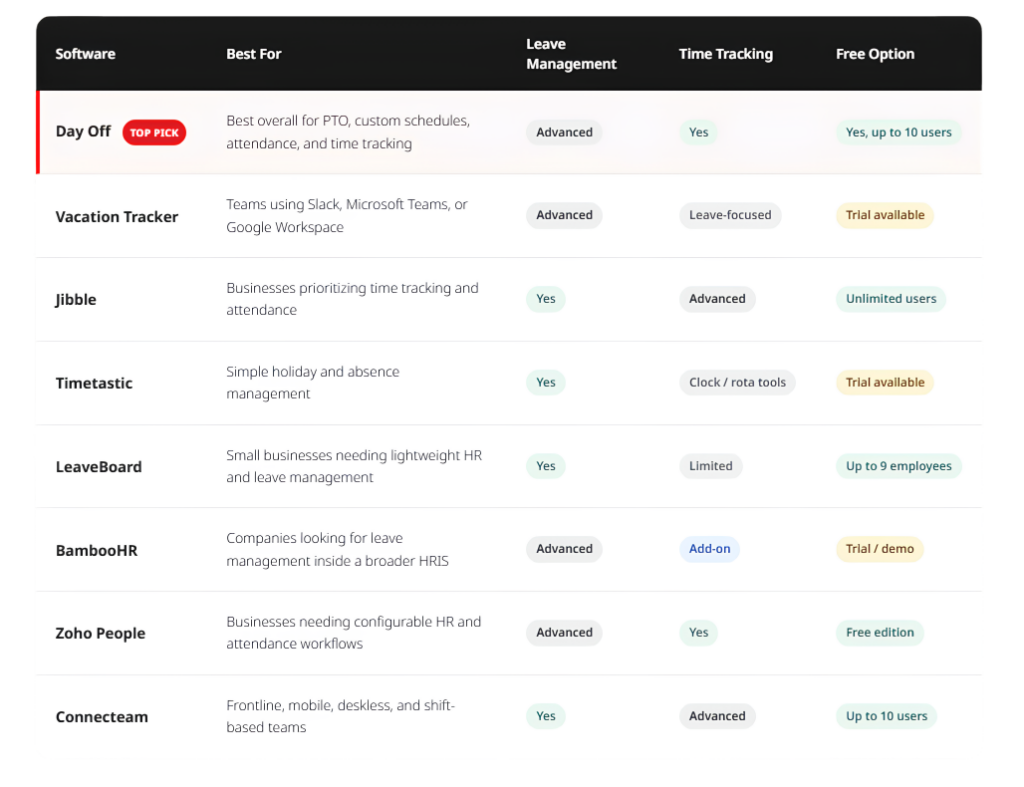
There is no universal winner for every organization. Day Off ranks first in this comparison because it provides one of the strongest balances between dedicated leave management, flexible work schedules, attendance, time tracking, workplace integrations, and relatively simple pricing without requiring businesses to adopt a much larger HR suite. Its Free plan supports up to 10 users, while Pro is listed at $2 per seat per month with a $20 monthly minimum.
Day Off: Best Overall Leave Management and PTO Tracker
Best for: Small and growing companies that want serious PTO management without implementing a full HRIS.
Day Off started with a clear focus: making employee leave easier to request, approve, calculate, and understand. That focus remains one of its biggest advantages because the product does not require businesses to purchase an entire payroll, recruitment, or performance-management system simply to manage time away from work.
At the same time, Day Off has expanded beyond a basic vacation tracker. The platform now connects PTO management, employee work schedules, attendance, and time tracking, making it particularly interesting for companies that want to understand both when employees are working and when they are away.
PTO and Leave Management
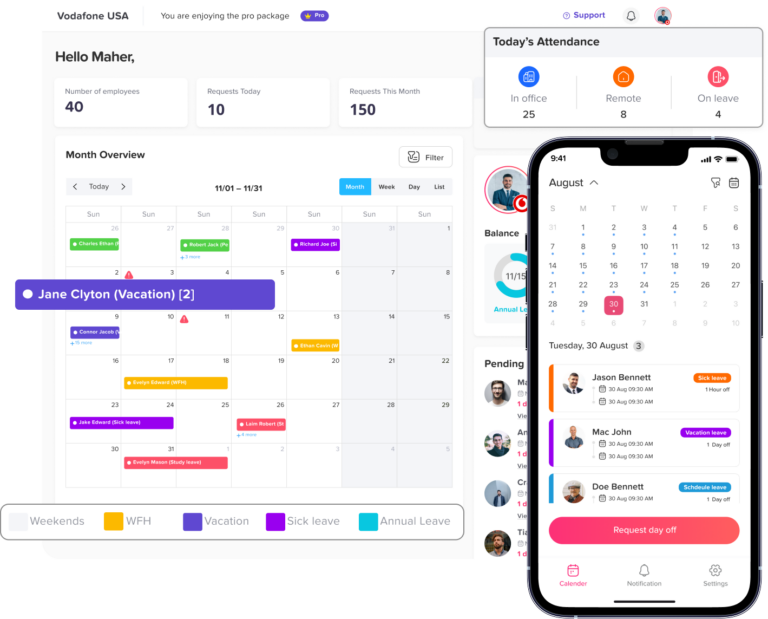
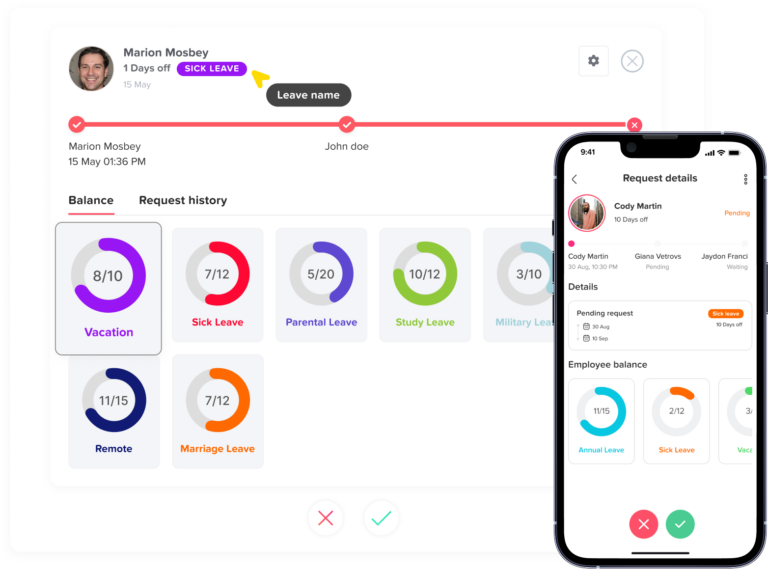
Employees can submit leave requests and see their available balances, while managers can review requests and see upcoming absences through shared calendars.
Companies can create different leave types and policies instead of treating every absence as generic vacation time. More advanced configurations can include two-level approvals, multiple approvers, blockout dates, different leave reset rules, and policies for different employee groups.
This becomes particularly useful as companies grow. A five-person startup may only need one person to approve vacation, while a larger company may require the employee’s manager and HR to review the same request.
Work Schedules Are a Major Advantage
One area where Day Off stands out is its connection between leave management and custom employee work schedules.
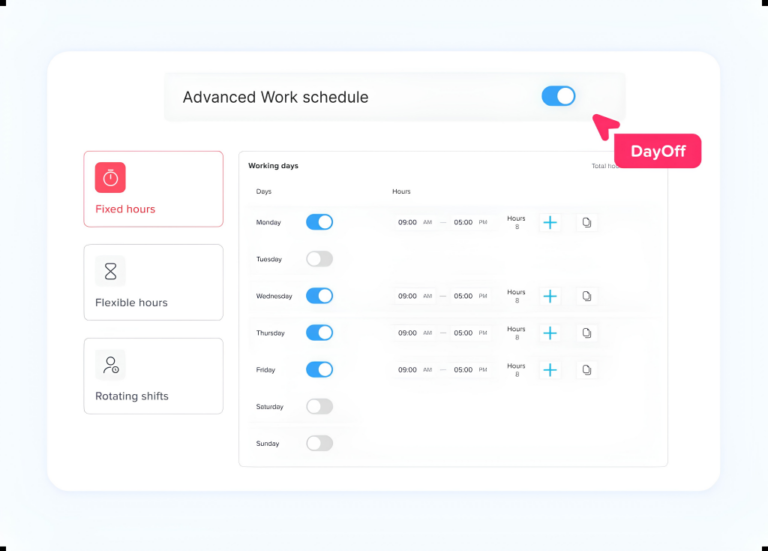
The platform currently supports Fixed Days, Fixed Hours, Flexible Hours, and Rotating Shifts. This allows the leave calculation to reflect when an employee was actually expected to work rather than automatically assuming everyone works Monday to Friday from nine to five.
Consider an employee working four 10-hour days each week. If the employee takes Tuesday off, a schedule-aware system can recognize that 10 scheduled working hours are being missed. If Friday is already a nonworking day, it should not be deducted from the employee’s balance.
That flexibility is valuable for companies employing part-time staff, shift workers, hybrid employees, compressed-workweek teams, or people following rotating schedules.
Day Off Time Tracker
Day Off has also moved into employee time tracking, bringing attendance and PTO into the same environment.
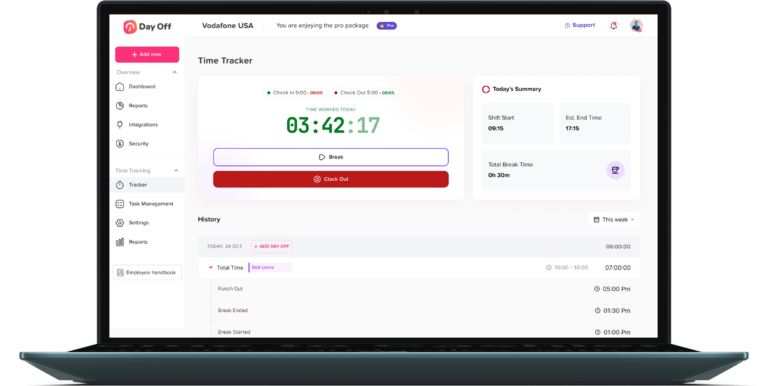
Its Time Tracker allows employees to punch in and punch out and record daily tasks. Managers can review attendance logs, working hours, missing punches, late arrivals, overtime, absences, and timesheets. Day Off also connects time tracking with employees’ leave and work schedules, helping managers distinguish between somebody who is absent unexpectedly and somebody who is already on approved leave.
This combination matters.
Many companies otherwise maintain one tool for PTO, another for timesheets, another schedule spreadsheet, and perhaps another system for attendance. Connecting these areas makes it easier to answer basic operational questions such as:
Who is working today? Who is on approved leave? How many hours did an employee work? Was somebody late? Which schedule was the employee expected to follow?
The result is a broader workforce view without turning Day Off into a heavyweight HRIS.
Integrations
Day Off offers a Free plan for up to 10 users. For teams that only need PTO and leave management, the Pro plan costs $2 per employee per month, with a $20 monthly minimum and a discount available for annual billing.
Companies that also want to use the Day Off Time Tracker, including employee time tracking, attendance, and timesheets, can choose the combined plan for $3 per employee per month.
This gives businesses the flexibility to pay only for what they need: choose the $2 PTO plan for leave management alone, or the $3 plan to manage both PTO and employee working time in one platform.
Why Day Off Ranks First
Day Off is especially compelling when leave management is the main requirement but the company also wants scheduling, attendance, and employee time tracking.
BambooHR and Zoho People offer broader HR functionality. Jibble has deeper time-and-attendance capabilities in areas such as GPS and facial recognition. Connecteam is particularly well suited to frontline workforces.
But for businesses primarily searching for a PTO tracker or leave management system, Day Off provides a strong balance: advanced leave rules, schedule-aware PTO calculations, calendars, approvals, integrations, attendance, and a Time Tracker without forcing the company into a much larger HR software suite.
Best choice for: Startups, SMBs, remote teams, hybrid organizations, international teams, and growing businesses that want leave and working-time management in one focused platform.
Vacation Tracker: Best for Slack, Teams, and Google Workspace Users
Vacation Tracker is another dedicated PTO management platform and is particularly well suited to companies that want leave requests to happen inside tools employees already use.
The platform supports PTO requests, approvals, leave policies, balances, and reports while integrating heavily with Slack, Microsoft Teams, and Google Workspace. Employees can request time off without relying on email chains or separate spreadsheets.
Vacation Tracker also supports more sophisticated leave-management requirements through its paid tiers, including automated accruals, notice-period rules, reports, integrations, and API-related functionality. Its pricing page currently advertises a 14-day free trial, with Core and Complete tiers and different pricing based on billing frequency and account requirements.
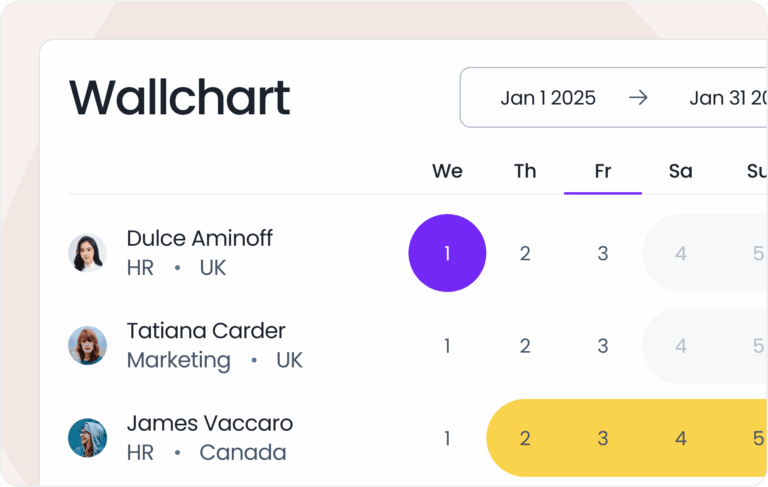
Its biggest strength is its focus. Like Day Off, Vacation Tracker does not try to replace every piece of HR software in the company.
For teams living inside Slack or Microsoft Teams, that can make adoption particularly easy.
Where Day Off has become broader through work schedules, attendance, and its Time Tracker, Vacation Tracker remains an especially strong option for organizations whose main priority is automating PTO administration and bringing leave requests into communication platforms.
Best choice for: Remote and distributed teams that rely heavily on Slack, Microsoft Teams, or Google Workspace.
Jibble: Best Free Time Tracking Platform With Leave Management
Jibble approaches the problem from the opposite direction.
Rather than starting primarily as leave management software, Jibble is strongly focused on time tracking and attendance, with PTO and leave management integrated into the broader product.
Its free plan is unusually generous. Jibble currently states that its time tracking software is free forever for unlimited users, with paid plans available for companies that need additional capabilities.
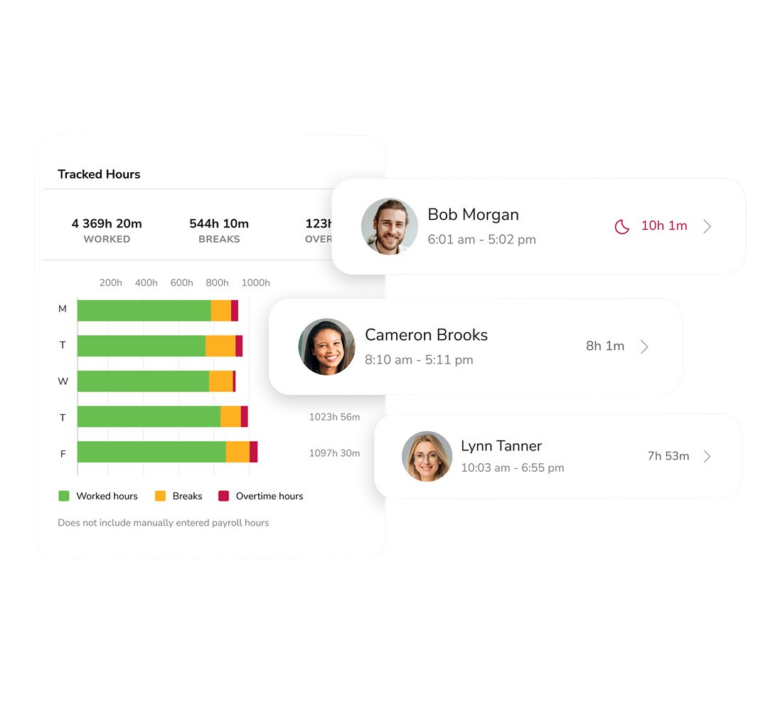
Jibble provides employee time clocks, timesheets, attendance reporting, project tracking, and options including GPS and facial-recognition attendance. Its leave-management functionality allows organizations to create policies, track accruals and balances, submit leave requests, and manage approvals.
That makes Jibble a particularly strong candidate when the company’s first requirement is:
“We need to track when employees work.”
and its second requirement is:
“We also need to manage PTO.”
Day Off fits the reverse scenario particularly well: PTO and employee availability are central, with time tracking added alongside them.
This distinction can make choosing between the two much easier.
Best choice for: Companies that prioritize clock-ins, attendance, GPS-based workforce tracking, timesheets, and a generous free tier while also needing PTO management.
Timetastic: Best for Simple Holiday and Absence Planning
Timetastic has built its reputation around making employee holiday management straightforward.
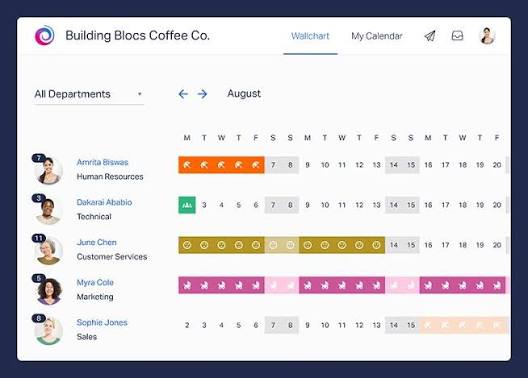
Employees can request time off from desktop or mobile, while managers can approve requests and view absences through a shared calendar. Its core product focuses on eliminating paper forms and spreadsheets rather than building an extremely complex HR system.
Timetastic has also expanded its workforce capabilities. Its website now promotes rota planning, clock-ins, and timesheets alongside its established holiday-management functionality.
Its pricing remains simple. As of August 2026, the standard Timetastic plan is listed at £1.20 per user per month, while Timetastic Pro is £2 per user per month. Both have a 30-day free trial. Pro adds capabilities including accrued leave, additional reporting, capped leave types, integrations, and SSO.
Timetastic is particularly attractive for smaller organizations that value simplicity and want employees to understand the system with minimal training.
Companies needing deeply configurable leave policies or more sophisticated workforce structures should compare its advanced functionality carefully against Day Off, Vacation Tracker, Zoho People, or larger HR platforms.
Best choice for: Small and medium businesses that want an uncomplicated holiday planner and absence calendar.
LeaveBoard: Best Lightweight HR and Leave Management Combination
LeaveBoard combines leave management with a small set of broader HR capabilities.
Instead of functioning only as a vacation calendar, the platform includes employee records, HR reports, leave policies, an absence calendar, employee self-service, and time-off management.
This makes it useful for small businesses that have outgrown spreadsheets but may not yet need a full-scale HR platform.
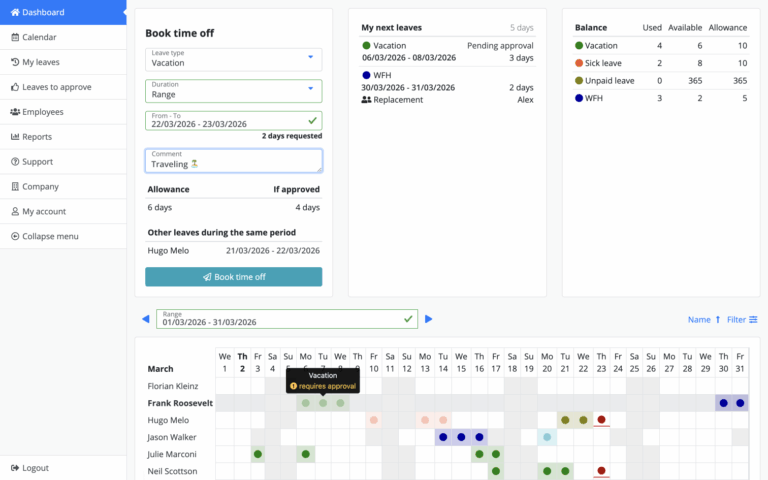
LeaveBoard currently offers a Free plan for companies with up to nine employees. Its published Pro pricing starts at $1.35 per employee per month, and the company offers a 14-day trial when moving into the paid package.
Employees can access leave information remotely, check balances, submit requests, and managers can approve time off.
Compared with Day Off, Jibble, or broader workforce-management products, LeaveBoard is more attractive for businesses looking for uncomplicated HR administration and leave tracking rather than extensive attendance or workforce-time functionality.
Best choice for: Small businesses wanting employee records and PTO tracking in a lightweight system.
BambooHR: Best for Companies That Need a Full HRIS
BambooHR is different from dedicated PTO trackers because leave management sits inside a much larger HR platform.
Its time-off functionality handles employee requests, accruals, balances, custom policies, approvals, and time-off calendars. Employees can also manage leave through BambooHR’s self-service and mobile experience.
The advantage is obvious for companies already looking for an HRIS.
Employee data, hiring, onboarding, benefits-related processes, time off, and other HR functions can live within the same ecosystem instead of requiring several specialized applications.
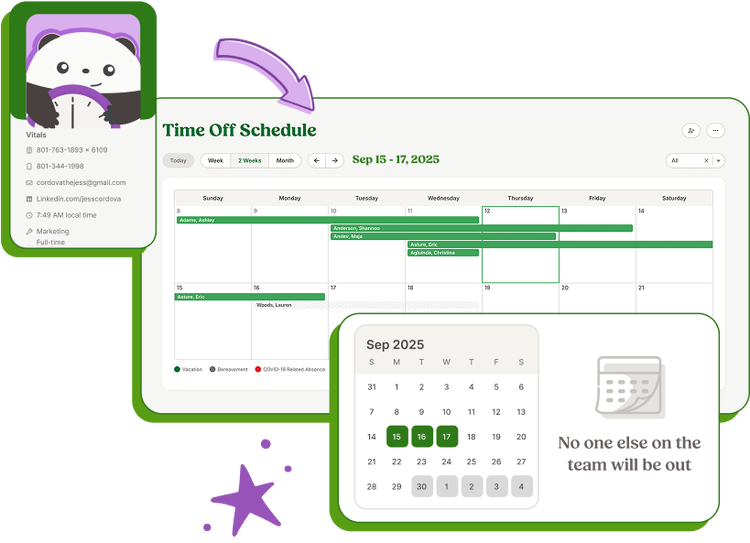
BambooHR also offers Time Tracking, with capabilities such as clock-in/out, project tracking, timesheet approval workflows, mobile access, reporting, and payroll synchronization. However, BambooHR states that Time Tracking is an additional-cost add-on rather than simply part of the core package.
BambooHR does not publish a simple universal per-user price on the pricing information reviewed for this comparison, so companies typically need to obtain pricing based on their requirements.
For a company that only wants PTO tracking, BambooHR may be more software than necessary. For organizations that want to centralize multiple HR processes, its broader scope becomes a major advantage.
Best choice for: Small and midsize businesses that want leave management as part of a broader HR platform.
Zoho People: Best for Configurable HR Workflows
Zoho People is another broader HR solution with strong leave and attendance functionality.
Its leave-management system provides centralized leave balances and requests, customizable leave policies, holiday management, reporting, and approval workflows that can include multiple approver levels. Zoho also connects People with Zoho Payroll for payroll-related workflows in supported environments.
Time management goes considerably further than PTO.
Zoho People provides attendance capabilities and timesheets, while its timesheet software supports manual logging or a digital timer, jobs, projects, clients, and approval workflows.
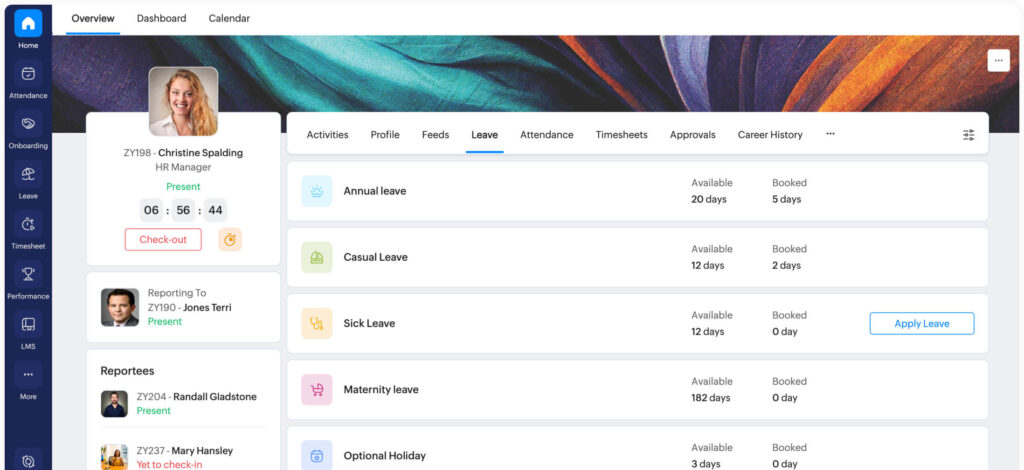
This makes Zoho People especially attractive to companies already using the wider Zoho ecosystem.
There is a Free edition as well as Essential HR, Professional, Premium, and Enterprise plans. Pricing and available functionality vary by edition, billing cycle, and market, so businesses should compare the current regional plan before making a decision.
The tradeoff is complexity. A dedicated PTO tracker such as Day Off or Timetastic can be easier to implement if employee leave is the primary problem. Zoho People becomes more compelling when the organization also wants broader employee-data, attendance, HR-process, and timesheet functionality.
Best choice for: Growing organizations already using Zoho products or companies wanting highly configurable HR workflows.
Connecteam: Best for Frontline and Deskless Teams
Connecteam is especially strong for organizations whose employees do not spend their working day sitting behind a laptop.
Retail, hospitality, construction, field services, logistics, and other deskless businesses often need PTO management to work alongside shift scheduling and time clocks.
Connecteam’s Time Off functionality supports custom policies, PTO balances, accrual and carryover rules, requests, scheduling visibility, and exports. Approved time off can also connect directly with job schedules and employee time clocks.
The broader Connecteam platform adds employee scheduling, mobile time tracking, communication, and other operational tools, making it significantly more than a vacation tracker.
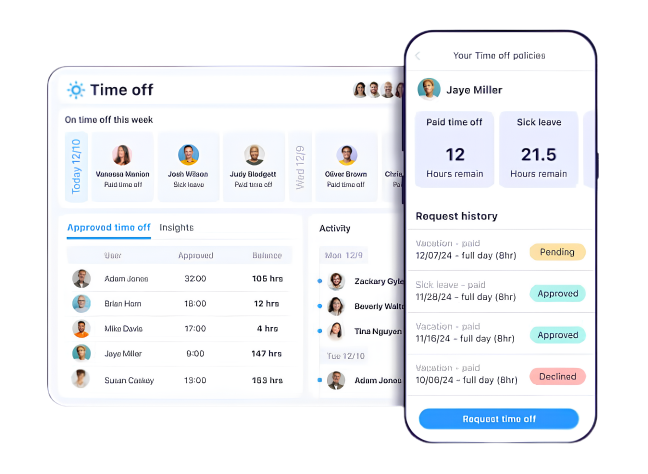
Connecteam offers a free option for businesses with up to 10 users, while paid products use a pricing structure that can cover up to 30 users at a fixed package price before additional-user charges apply.
For a traditional office or remote software team, some of Connecteam’s workforce functionality may be unnecessary. For businesses managing shifts and workers in different physical locations, those same features can be a major advantage.
Best choice for: Frontline, mobile, shift-based, and deskless workforces.
Which Leave Management Software Is Best?
There is no single leave management platform that is the best fit for every company. The right choice depends on whether your main priority is PTO management, time tracking, broader HR administration, or workforce scheduling.
Day Off. Best overall for PTO-focused teams that also need time tracking
Choose Day Off if leave and PTO management are your main priorities, but you also want custom work schedules, attendance tracking, punch in/out, timesheets, shared calendars, approval workflows, and workplace integrations in the same platform. It is particularly suitable for small and growing companies that need more than a basic vacation tracker but do not want the complexity of a full HRIS.
Vacation Tracker
Vacation Tracker is a strong choice for companies that want dedicated PTO management closely connected to the communication tools employees already use. It works especially well for distributed teams that want employees to request and manage leave without constantly switching between platforms.
Jibble
Choose Jibble when clock-ins, attendance, timesheets, and employee working hours are more important than advanced leave management. Its strong free offering makes it particularly attractive to businesses that want to start with time and attendance tracking while still having access to PTO functionality.
Timetastic
Timetastic is a good option for businesses that want a simple way to replace holiday spreadsheets and email-based leave requests. Its strength is ease of use rather than highly complex leave policies, making it suitable for smaller teams with relatively straightforward absence-management requirements.
LeaveBoard
LeaveBoard combines PTO tracking with basic employee records and HR administration. It can work well for smaller companies that want slightly more than a standalone vacation calendar but are not yet ready for a larger HR platform.
BambooHR
BambooHR makes more sense when leave management is only one part of a broader HR strategy. Companies can manage employee information, onboarding, HR processes, time off, and additional workforce functions within the same ecosystem. It is a stronger fit for organizations replacing multiple HR tools rather than those simply looking for a PTO tracker.
Zoho People
Zoho People is a strong option for organizations that need flexible HR processes covering attendance, leave, employee data, timesheets, and approval workflows. It is particularly attractive for companies already using other Zoho applications and wanting their HR system to sit within the same ecosystem.
Connecteam
Connecteam is designed particularly well for businesses managing employees who work in stores, restaurants, construction sites, warehouses, field locations, or shifts. Its combination of scheduling, mobile time tracking, communication, and time off management makes it better suited to frontline operations than a traditional office-focused PTO tracker.
What Features Should You Look for in PTO Tracking Software?
Choosing PTO tracking software should start with the problems your company is trying to solve. The best platform is not necessarily the one with the longest feature list, but the one that matches your leave policies, approval process, employee schedules, and reporting needs.
When comparing PTO and leave management tools, these are the most important features to look for:
Accurate PTO Balance Tracking
The system should automatically maintain each employee’s available, used, accrued, and carried-over leave balance. Manual balance calculations can quickly become unreliable as the team grows, especially when employees follow different policies or accrual schedules.
Custom Leave Types and Policies
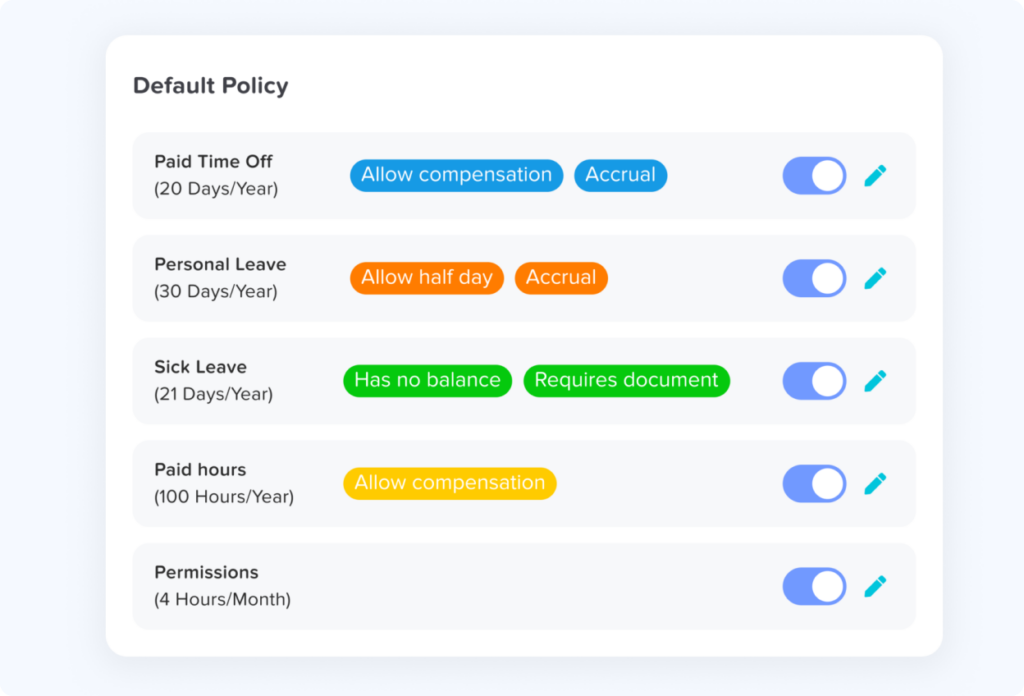
A good PTO tracker should allow companies to create different leave types such as vacation, sick leave, parental leave, unpaid leave, personal days, or compensatory time. Each leave type may need its own allowance, accrual method, carryover rule, reset date, or eligibility requirements.
Flexible PTO Accrual Rules
Companies should be able to configure how employees earn leave, whether PTO accrues monthly, biweekly, annually, or according to another schedule. Features such as carryover limits, accrual caps, waiting periods, and different policies for employee groups can become especially important as the organization grows.
Custom Approval Workflows
Approval requirements vary significantly between companies. Small teams may only need one manager to approve a request, while larger organizations may need multiple approvers or several approval stages. The software should support the approval structure your company actually uses instead of forcing every request through the same process.
Support for Different Work Schedules
PTO calculations should reflect when employees are actually scheduled to work. This is particularly important for part-time employees, compressed workweeks, rotating shifts, flexible schedules, and employees with different working days or hours. A system that assumes everyone works eight hours from Monday to Friday can create incorrect PTO deductions.
Shared Leave Calendar and Team Visibility
Managers should be able to see upcoming absences before approving new requests. A shared calendar makes it easier to identify overlapping vacations, maintain staffing coverage, and plan projects around employee availability.
Employee Self-Service
Employees should be able to check their balances, submit leave requests, review request status, and view upcoming time off without contacting HR for every update. Self-service reduces repetitive administrative work and gives employees clearer visibility into their own leave.
Reporting and Leave History
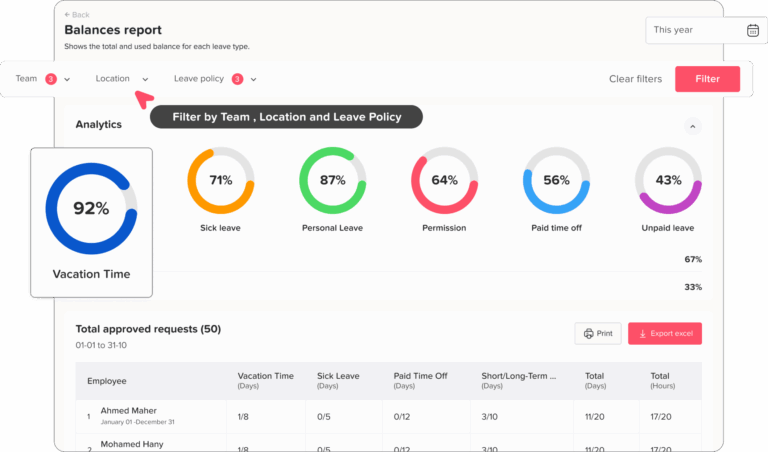
Useful reports should show information such as PTO balances, leave taken, accrual activity, carryover, absence trends, and employee leave history. Reliable reporting makes it easier for HR teams to audit balances, review policies, and answer payroll or management questions.
Calendar and Workplace Integrations
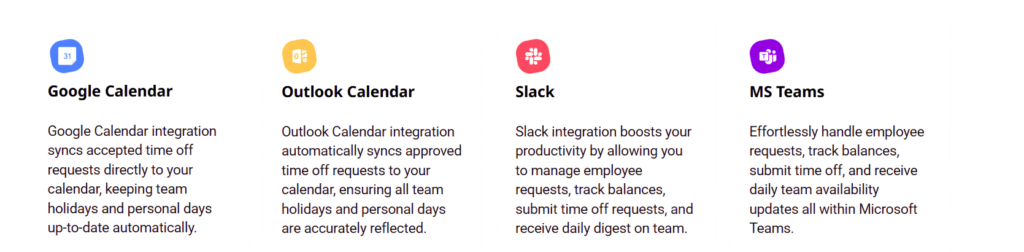
Integrations with tools such as Slack, Microsoft Teams, Google Calendar, and Outlook can make leave information available where employees already work. This reduces duplicate updates and helps teams stay aware of who is available without constantly checking a separate PTO system.
Mobile Access
Employees and managers should be able to request, approve, and review leave when they are away from their desks. Mobile access is especially valuable for distributed teams, managers on the move, and employees who do not work primarily from a desktop computer.
Time Tracking and Attendance Integration
Companies should also decide whether PTO tracking needs to connect with employee working hours. When leave, attendance, schedules, punch in/out records, and timesheets are connected, managers gain a more complete picture of employee availability and working time.
PTO Tracker vs. Time Tracker: Do You Need Both?
PTO tracking and time tracking solve different problems, but for many businesses they work best when they are connected.
A PTO tracker manages the time employees are away from work. This includes vacation, sick leave, personal leave, parental leave, unpaid leave, and other approved absences.
A Time Tracker focuses on the time employees actually work. Depending on the platform, it may record clock-in and clock-out times, total working hours, task or project time, overtime, attendance, and timesheets.
The difference is simple:
- PTO tracking answers: When is the employee not expected to work?
- Time tracking answers: When did the employee actually work, and for how long?
Both sets of information are useful on their own, but they become much more valuable when viewed together.
Why Connecting PTO and Time Tracking Matters
Using separate systems for leave and working time can create gaps in employee records.
For example, imagine an employee does not clock in on Tuesday. A standalone time-tracking system may simply show a missing attendance record.
Without access to the employee’s leave information, a manager may need to check another system to determine whether the employee was absent unexpectedly or had already received approval for PTO.
When the systems are connected, the situation is much clearer:
- The employee was scheduled to work on Tuesday.
- An approved leave request covers the full shift.
- No clock-in was expected.
- The absence should not be treated as a missed punch or attendance issue.
This reduces unnecessary investigations and gives HR and managers more accurate context.
When a PTO Tracker Alone Is Enough
A dedicated PTO tracker may be all you need if your main goal is to:
- Manage vacation and sick leave balances
- Automate leave accruals
- Handle approval workflows
- Track carryover and policy rules
- Show upcoming absences on a shared calendar
- Give employees self-service access to their leave information
This setup often works well for salaried office teams that do not need detailed attendance or timesheet tracking.
When You Should Add Time Tracking
Time tracking becomes more useful when your company also needs to monitor:
- Employee clock-in and clock-out times
- Total hours worked
- Attendance and late arrivals
- Overtime
- Timesheets
- Project or task hours
- Differences between scheduled and actual working time
This is especially relevant for hourly employees, hybrid teams, remote workers, service businesses, and companies with flexible or changing schedules.
The Advantage of Using One Connected Platform
When PTO, work schedules, attendance, and time tracking are managed together, managers get a more complete picture of employee availability.
Instead of checking several systems, they can understand:
- Who is scheduled to work
- Who is currently on leave
- Who clocked in
- How many hours were worked
- Whether an absence was approved
- Whether actual working time matches the planned schedule
That can improve reporting, reduce manual checks, and make workforce planning more reliable.
Platforms such as Day Off bring these areas together by combining leave management with custom work schedules, attendance, punch in/out, and Time Tracker functionality.
Companies that only need PTO management can use Day Off for leave tracking alone, while businesses that also want to monitor employee working time can choose the plan that includes Time Tracker.
Which Setup Is Right for Your Business?
The answer depends on what your company needs to manage.
Choose a PTO tracker only if your main challenge is managing leave requests, balances, approvals, and employee availability.
Choose PTO + time tracking if you also need accurate information about attendance, working hours, timesheets, or how actual work compares with employee schedules.
For growing companies, using connected tools can also make future expansion easier because leave, schedules, attendance, and working time remain part of the same workforce-management process rather than being spread across multiple applications.
Frequently Asked Questions About PTO Tracking Software
What is the best PTO tracker for small businesses?
The best PTO tracker for a small business is one that matches the company’s actual leave process without introducing unnecessary HR complexity. Look for automated PTO balances, employee self-service, approval workflows, a shared leave calendar, flexible leave policies, and support for different employee schedules.
For businesses that primarily need leave management but also want the option to manage work schedules, attendance, and employee time tracking, Day Off is a strong choice. Companies that need a complete HRIS may prefer a broader platform such as BambooHR or Zoho People, while businesses focused mainly on time and attendance may prefer a time-first platform such as Jibble.
Is there a free PTO tracker?
Yes. Several PTO and workforce-management platforms offer free plans, although the limits and included features vary.
Day Off offers a Free plan for teams of up to 10 users. Other products in this comparison, including Jibble, Connecteam, and LeaveBoard, also provide free options under different conditions.
When comparing free PTO trackers, look beyond the employee limit. Check whether the free plan includes the leave policies, approvals, reports, calendars, and balance rules your company actually needs.
What is the best way to track employee PTO?
For very small teams with simple policies, a spreadsheet can work. However, dedicated PTO tracking software becomes more practical when employees accrue leave automatically, managers need to approve requests, policies differ between employees, or several people need access to accurate balances.
PTO software can automate accruals, update balances after approved requests, maintain leave history, and give employees direct access to their available time off. Current PTO software guides commonly recommend moving from manual tracking to automated software as leave administration becomes more complex.
Can I track PTO in Excel or Google Sheets?
Yes. Excel or Google Sheets can be sufficient for a very small team with straightforward leave rules.
The difficulty appears as the company grows. Someone must manually maintain accrual formulas, update approved leave, correct balances, manage overlapping requests, and ensure everyone is using the latest version of the spreadsheet.
Dedicated PTO software adds automated calculations, approval workflows, employee self-service, calendars, and centralized records that spreadsheets do not provide automatically. Comparisons between spreadsheets and PTO software consistently identify growing policy complexity and manual maintenance as key reasons companies eventually move to dedicated systems.
When should a company switch from a PTO spreadsheet to software?
There is no single employee number at which a spreadsheet stops working. A better indicator is the amount of manual administration involved.
It may be time to switch when HR regularly corrects balances, managers cannot easily see who is off, employees repeatedly ask how much PTO they have left, different groups follow different leave policies, or approvals are being managed through email and chat messages.
The more rules and people involved, the more valuable automation becomes.
What should PTO tracking software include?
At minimum, PTO tracking software should provide employee leave balances, time-off requests, manager approvals, leave policies, calendars, and leave history.
More advanced systems may also provide automated accruals, carryover rules, multiple approval levels, reporting, custom work schedules, integrations, role-based permissions, mobile access, attendance, and time tracking.
The most important feature set depends on how your workforce operates. A company with rotating or compressed schedules, for example, should pay particular attention to whether the PTO system understands each employee’s scheduled working days and hours.
Can PTO software track employees with different work schedules?
Yes, but not every PTO tracker handles work schedules with the same level of flexibility.
Schedule-aware leave software can calculate time off according to when an employee was actually expected to work. This is useful for part-time employees, compressed workweeks, rotating shifts, flexible schedules, and employees working different hours on different days.
For example, an employee missing a 10-hour scheduled shift should not automatically be treated the same as an employee missing an eight-hour shift. Day Off supports multiple custom work-schedule structures and connects them with leave calculations.
Can PTO tracking software integrate with Slack or Microsoft Teams?
Yes. Some leave-management platforms integrate directly with workplace communication tools.
These integrations can allow employees to request leave, receive notifications, or view absence information without relying entirely on a separate HR dashboard. Vacation Tracker, for example, integrates with Slack, Microsoft Teams, and Google Workspace, while Day Off also supports workplace and calendar integrations.
For teams that spend most of their working day inside Slack or Teams, these integrations can make the leave-management process easier to adopt.
Can time tracking software also track PTO?
Some platforms combine employee time tracking with PTO management, while others specialize in only one of the two.
Jibble, for example, connects approved leave with timesheets and keeps PTO separate from regular working hours. Day Off also combines PTO management with work schedules, attendance, and Time Tracker functionality.
An integrated system can be useful when managers want to understand both why an employee was absent and how much time they actually worked.
What is the difference between PTO tracking and time tracking?
PTO tracking manages time employees are approved to be away from work, such as vacation, sick leave, personal leave, or other absences.
Time tracking records time employees actually work, which can include clock-in and clock-out times, working hours, tasks, projects, overtime, or timesheets.
Companies may need only one of these functions, but connecting them provides a more complete picture of employee schedules, absences, attendance, and working time.
Should PTO and time tracking be in the same system?
They do not have to be, but using the same platform can reduce duplicate records and manual checks.
For example, if an employee does not clock in, a manager using a disconnected time-tracking system may need to check another application to determine whether the employee has approved leave. When schedules, PTO, attendance, and time records are connected, the reason for the missing clock-in can be easier to understand.
Businesses with hourly employees, flexible schedules, hybrid teams, or detailed attendance requirements may benefit most from connecting the two.
Do small businesses really need PTO tracking software?
Not every small company needs dedicated software immediately. A business with only a handful of employees and one simple vacation policy may be able to manage leave with a spreadsheet or shared calendar.
PTO software becomes more useful when the company introduces accruals, several leave types, multiple managers, different work schedules, carryover rules, or more employees. At that point, automation can replace a growing amount of manual calculation and administrative work.
For small businesses, the goal should not be to buy the most complex HR system available. It should be to choose a tool that solves today’s leave-management problems while still being flexible enough to support future growth.
Final Thoughts
The best leave management software should simplify PTO tracking, approvals, and employee availability without adding unnecessary complexity.
Timetastic and LeaveBoard work well for simpler leave needs, while Jibble and Connecteam are stronger for attendance and workforce tracking. BambooHR and Zoho People are better suited to companies looking for broader HR platforms.
Day Off stands out as a balanced option for growing teams, combining PTO management, custom work schedules, approvals, attendance, integrations, and Time Tracker functionality in one focused platform.
For businesses that want to start with leave tracking and expand into broader workforce management over time, Day Off is one of the strongest options to consider in 2026.
Pricing note: Features and pricing may change, so always confirm the latest details with each provider.